Showing posts with label macOS Ventura. Show all posts

Thursday, December 15, 2022

Apple Has Released macOS Ventura 13.1, iOS 16.2, iPadOS 16.2, tvOS 16.2, And watchOS 9.2

macOS Ventura 16.2

Here are Apple’s release notes for macOS Ventura 16.2:

Freeform
– Freeform is a new app for working creatively with friends or colleagues on Mac, iPad and iPhone
– A flexible canvas lets you add files, images, stickies, and more

Advanced Data Protection for iCloud
– New option expands the total number of iCloud data categories protected using end-to-end encryption to 23 — including iCloud Backup, Notes, and Photos — protecting your information even in the case of a data breach in the cloud

This update also includes the following improvements and bug fixes:
– Improved search in Messages allows you to find photos based on their content, like a dog, car, person, or text
– Participant Cursors in Notes allow you to see live indicators as others make updates in a shared note
– Play sound in Find My app can now help you pinpoint the location of nearby AirTags, AirPods Pro (2nd generation) case, and Find My network accessories
– Fixes an issue that causes some notes not to sync with iCloud after updates are made
– Fixes an issue where you may lose keyboard and mouse input in some apps and games

macOS Ventura‌‌ 16.2 can be downloaded for free on all eligible Macs using the Software Update section of System Settings. Apple has also released macOS Big Sur 11.72 and macOS Monterey 12.6.2 for Mac users that are not able to update to Ventura.

iOS 16.2 AND iPADOS 16.2

Here are Apple’s release notes on iOS 16.2 and iPadOS 16.2:

Freeform
– Freeform is a new app for working creatively with friends or colleagues on Mac, iPad and iPhone
– A flexible canvas lets you add files, images, stickies, and more
Drawing tools let you sketch anywhere on the canvas with your finger

Apple Music Sing
– A new way to sing along with millions of your favorite songs in Apple Music
– Fully adjustable vocals let you duet with the original artist, sing solo, or mix it up
– Newly enhanced beat-by-beat lyrics make it even easier to follow along with the music

Advanced Data Protection for iCloud
– New option expands the total number of iCloud data categories protected using end-to-end encryption to 23 — including iCloud Backup, Notes, and Photos — protecting your information even in the case of a data breach in the cloud

Lock Screen
– New settings allow you to hide wallpaper or notifications when Always-On display is enabled on iPhone 14 Pro and iPhone 14 Pro Max
– Sleep widget lets you view your most recent sleep data
– Medications widget lets you view reminders and quickly access your schedule

Game Center
– SharePlay support in Game Center for multiplayer games so you can play with the people you are on a FaceTime call with
– Activity Widget allows you to see what your friends are playing and achieving in games right from your Home Screen

Apple TV
– Live Activities for Apple TV app let you follow your favorite teams with live scores right on your Lock Screen or in Dynamic Island on iPhone 14 Pro and iPhone 14 Pro Max

Home
– Improved reliability and efficiency of communication between your smart home accessories and Apple devices

This update also includes the following improvements and bug fixes:
– Improved search in Messages allows you to find photos based on their content, like a dog, car, person, or text
– Turn Off Hide IP Address setting enables iCloud Private Relay users to temporarily disable the service for a specific site in Safari
– News articles in Weather display information relevant to the weather in that location
– Participant Cursors in Notes allow you to see live indicators as others make updates in a shared note
– AirDrop now automatically reverts to Contacts Only after 10 minutes to prevent unwanted requests to receive content
– Crash Detection optimizations on iPhone 14 and iPhone 14 Pro models
– Fixes an issue that causes some notes not to sync with iCloud after updates are made


Apple also has some ‌iPad‌ specific notes:

Stage Manager
– External display support with resolutions up to 6K available on iPad Pro 12.9-inch (5th generation and later), iPad Pro 11-inch (3rd generation and later), and iPad Air (5th generation)
– Drag and drop files and windows from your compatible device to your connected display, and vice versa
– Support for using up to 4 apps on the iPad display and 4 on the external display

iPad Specific Features and Fixes
– Tracking Notifications alert you if an AirTag separated from its owner is nearby and has recently played a chime to indicate it is moving
– Fixes an issue that may cause Multi-Touch gestures to become unresponsive while using the Zoom accessibility feature

‌‌iOS 16‌‌.2  and iPadOS 16.2  can be downloaded on eligible iPhones and iPads over-the-air by going to Settings —> General —> Software Update. 

Apple has also released iOS 15.7.2 for iPhone users who have older devices, with the update offering security improvements.


tvOS 16.2

tvOS 16.2 brings multi-user voice recognition for Siri and also Apple Music Sing with the karaoke experience. t can be downloaded by going to the Settings app on your Apple TV set-top box. Then go to System —> Software Update.


watchOS 9.2

Here are Apple’s release notes on watchOS 9.2:

watchOS 9.2 includes new features, improvements, and bug fixes, including:
– Outdoor Run workout now automatically detects when you arrive at a running track and provides track specific metrics
– Race Route lets you compete against your previous performance in Outdoor Run, Outdoor Cycle, and Outdoor Wheelchair Workouts
– New custom Kickboxing algorithm in the Workout app for more accurate metrics
– Noise app displays when environmental sound levels are reduced while wearing AirPods Pro (1st generation) and AirPods Max with active noise cancellation
– Family Setup users can be invited to the Home app to control HomePod speakers and smart home accessories, and unlock doors with home keys in Wallet
– Accessibility support to visualize when Siren is in use on Apple Watch Ultra
– Improved response time and accuracy of hand gesture controls for AssistiveTouch and Quick Actions
– Crash Detection optimizations on Apple Watch Ultra, Apple Watch Series 8, and Apple Watch SE (2nd generation)
– Fix for bug that causes display of incorrect watch time immediately after dismissing an alarm in Sleep Focus
– Fix for bug causing interruptions to mindfulness sessions

Apple Watch owners can download the update by opening up the Apple Watch app on their iPhone and going to General —> Software Update. 

Saturday, October 22, 2022

macOS Ventura And iPadOS 16 Arriving On October 24th

Here are some of the highlights of macOS Ventura (in Apple’s words): Stage Manager gives Mac users an all-new way to stay focused on the task in front of them while seamlessly switching between apps and windows. Continuity Camera uses iPhone as the webcam on Mac to do things that were never possible before,1 and with Handoff coming to FaceTime, users can start a FaceTime call on their iPhone or iPad and fluidly pass it over to their Mac. Mail and Messages come with great new features that make the apps better than ever, while Safari — the world’s fastest browser on Mac — ushers in a passwordless future with passkeys. And with the power and popularity of Apple silicon, and new developer tools in Metal 3, gaming on Mac has never been better.

Here are some of the highlights of iPadOS 16 (in Apple’s words): Taking advantage of the power of the M1 chip, Stage Manager brings a new way to multitask with multiple overlapping windows and full external display support. Collaboration is easier than ever with new ways to start working with others in apps across the system using Messages, and the new Freeform app provides a flexible canvas to brainstorm on together. New tools in Mail help users be more productive, Safari adds shared Tab Groups to browse the web with others, and the browsing experience gets even more secure with passkeys. The new Weather app takes full advantage of the stunning iPad display, and Live Text now interacts with text in video. New pro features — including Reference Mode and Display Zoom — make iPad an even more powerful mobile studio. Combined with the power of Apple silicon, iPadOS 16 makes it faster and easier to get more done on iPad.

Wednesday, June 8, 2022

macOS Ventura Will Have A Stage Manager Feature, As Well As The Ability To Use An iPhone As A Webcam

Apple has previewed macOS Ventura, the latest version of the Mac’s operating system. It adds a Stage Manager feature, the ability to use an iPhone as a webcam, and more.

Stage Manager gives Mac users a new way to stay focused on the task in front of them while switching between apps and windows. Continuity Camera can now uses iPhone as the webcam. With Handoff coming to FaceTime, users can start a FaceTime call on their iPhone or iPad, and pass it over to their Mac. Mail and Messages come with new, while Safari promises a “passwordless future with passkeys.”

Stage Manager

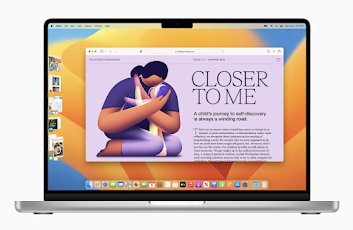
Stage Manager automatically organizes open apps and windows so users can concentrate on their work and still see everything in a single glance, according to Craig Federighi, Apple’s senior vice president of Software Engineering. The current window users are working in is displayed prominently in the center, and other open windows appear on the left-hand side so they can witch between tasks. Users can also group windows together when working on specific tasks or projects that require different apps. Stage Manager works in concert with other macOS windowing tools — including Mission Control and Spaces — and users can now get to their desktop with a single click.

Apple Devices Working Together with Continuity

Continuity Cameranow gives Mac customers the ability to use their iPhone as a webcam. With the power of Continuity, Mac can automatically recognize and use the camera on an iPhone when it’s nearby — without the need to wake or select it. The smartphone can even connect to Mac wirelessly for greater flexibility.

Continuity Camera delivers innovative features to all Mac computers including Center Stage, Portrait mode, and the new Studio Light — an effect that beautifully illuminates a user’s face while dimming the background, says Federighi. 

Plus, Continuity Camera taps into the Ultra Wide camera on iPhone to enable Desk View, which simultaneously shows the user’s face and an overhead view of their desk. Handoff now comes to FaceTime, allowing users to start a FaceTime call on one Apple device and seamlessly transfer it to another Apple device nearby. Users can be on a FaceTime call on iPhone or iPad, then move the call to their Mac with just a click, or start a call on their Mac and shift to iPhone or iPad when they need to continue on the go.


More Secure Browsing in Safari

Browsing in Safari is purportedly even safer with passkeys, next-generation credentials that are more secure, easy to use, and designed to replace passwords. Passkeys are unique digital keys that stay on device and are never stored on a web server, so hackers can’t leak them or trick users into sharing them. 

Apple says passkeys make it simple to sign in securely, using Touch ID or Face ID for biometric verification, and iCloud Keychain to sync across Mac, iPhone, iPad, and Apple TV with end-to-end encryption. They will also work across apps and the web, and users can even sign in to websites or apps on non-Apple devices using their iPhone.

Immersive Gaming Experiences

Apple says the power of Apple silicon enables every new Mac to run AAA games with ease, including upcoming titles such as EA’s GRID Legends and Capcom’s Resident Evil Village. And since Apple silicon also powers iPad, game developers can bring their AAA games to even more users, like No Man’s Sky from Hello Games, which is coming to both Mac and iPad later this year.

Metal 3, the latest version of the software that powers the gaming experience across Apple platforms, introduces new features designed to take the gaming experience on Mac to new heights. MetalFX Upscaling enables developers to quickly render complex scenes by using less compute-intensive frames, and then apply resolution scaling and temporal anti-aliasing. 

Apple says the result is accelerated performance that provides gamers with a more responsive feel and graphics that look stunning. Game developers also benefit from a new Fast Resource Loading API [application programming interface] that minimizes wait time by providing a more direct path from storage to the GPU, so games can easily access high-quality textures and geometry needed to create expansive worlds for realistic and immersive gameplay.

More macOS Ventura features, according to Apple

  • Live Text uses on-device intelligence to recognize text in images across the system, and now adds support for paused video frames, as well as Japanese and Korean text. Users can also now lift the subject away from an image and drop it into another app. And Visual Look Up expands its recognition capabilities to now include animals, birds, insects, statues, and even more landmarks.
  • The Weather and Clock apps, with all the features users know and love from iPhone, have been optimized for Mac.
  • New accessibility tools include Live Captions for all audio content, Type to Speak on calls, Text Checker to support proofreading for VoiceOver users, and more.7
  • System Settings is the new name for System Preferences, and comes with a refreshed and streamlined design that is easier to navigate and instantly familiar to iPhone and iPad users.
  • macOS security gets even stronger with new tools that make the Mac more resistant to attack, including Rapid Security Response that works in between normal updates to easily keep security up to date without a reboot.

Availability

The developer beta of macOS Ventura is available to Apple Developer Program members at developer.apple.com starting today. A public beta will be available to Mac users next month at beta.apple.com. macOS Ventura will be available this fall as a free software update. 

For more information, including compatible Mac models, visit apple.com/macos/ventura-preview. Features are subject to change. Some features may not be available in all regions or languages.